
FREE RESOURCE · RE-CHECK BEFORE SEND
Check right
before you act.
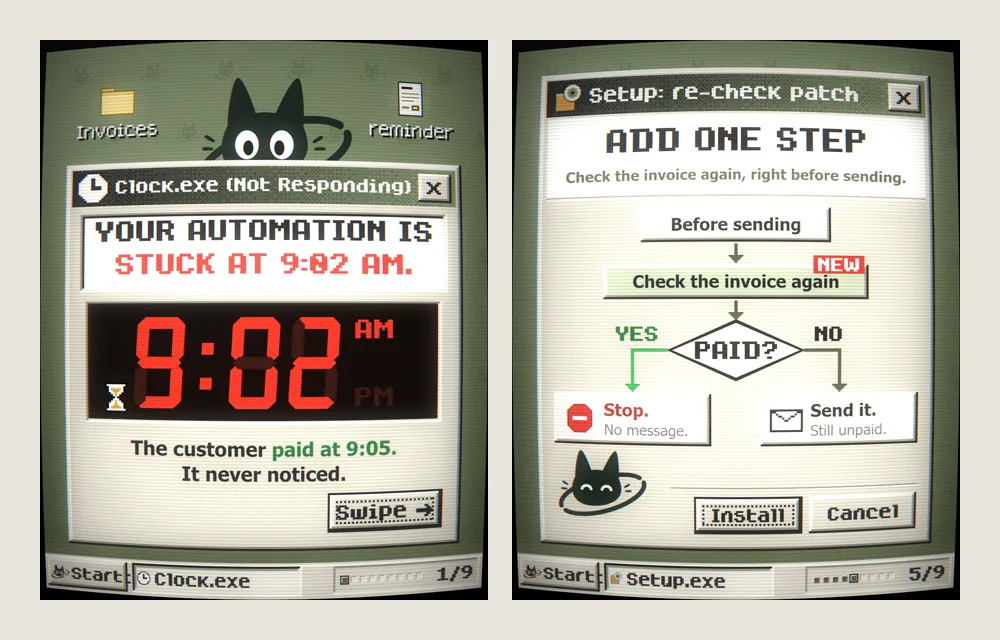
Your automation decided at 9:02 and sent at 9:10. Here’s the one-step fix, a template you can copy, and three more places the same bug shows up.
THE BUG
3 events.
8 minutes.
- The reminder checks invoice #1042.UNPAIDIt queues an “overdue” reminder.
- The customer pays.PAIDThe live invoice is now paid.
- The reminder sends “Your invoice is OVERDUE”.SENTIt used what it saw at 9:02.
“I literally paid 5 minutes ago??”
It decided at 9:02.
It sent at 9:10.
The reminder was working from a snapshot: status UNPAID, taken at 9:02. By the time it sent, the live invoice said PAID.
Any gap between deciding and acting is a window for the facts to change: a delay step, a queue, a batch that runs later, a “wait one day” step. Nothing was broken. It just never looked again.
THE RULE
Right before a scheduled step runs, have it read the live status again.
Paid? Stop. Unpaid? Send.
THE PATTERN
Add one step.
Six small rules turn any scheduled message into one that checks before it acts.
- 01
Save the ID, not the status.
When the trigger fires, store which record it is about (invoice #1042), not a copy of its status.
- 02
Wait as usual.
The delay, queue or schedule runs exactly as before.
- 03
Re-check right before acting.
Read the record again from the system that owns it (your invoicing, booking or store system), not from the copy saved earlier.
- 04
Decide again.
Still true, still unpaid? Send. Changed to paid? Stop: send nothing, and log why.
- 05
Can’t check? Don’t send.
If the lookup fails, retry later or alert a person. When in doubt, nothing goes out.
- 06
Log what happened.
When it checked, the status it found, and whether it sent or skipped.
RE-CHECK-BEFORE-SEND TEMPLATE

WHEN [the trigger happens]
  SAVE the record ID (not its status)
  WAIT until [send time]

RIGHT BEFORE SENDING
  READ the live status from [its system]
  IF [still true]    → SEND it
  IF [changed]       → STOP. Send nothing,
                       log why.
  IF [can't read it] → DON'T SEND. Retry
or alert a person.EXAMPLE: THE INVOICE REMINDER
WHEN an invoice is past due and unpaid
SAVE invoice #1042
WAIT until 9:10 AM
RIGHT BEFORE SENDING
READ the status from the invoicing tool
IF still UNPAID → send the reminder
IF PAID → stop. No message.
IF lookup fails → don't send.
Alert a person.REPLAY, WITH THE PATCH
- Invoice #1042: UNPAID
- The customer pays: PAID
- Checks again: PAIDThe reminder closes itself. Message correctly not sent.
Test it: schedule a reminder for a test record, change its status before the send time, and confirm nothing goes out. Then schedule one you leave unchanged and confirm it does send.
WHERE ELSE THIS BITES
Same bug.
Three more places.
Anything scheduled ahead of time can act on old news. The fix is the same: re-check right before it runs.
A booking reminder after they cancelled
Re-checkStill booked?
Read the booking from your booking system. Still booked: send. Cancelled: stop.
A cart nudge after they bought
Re-checkStill in the cart?
Read the cart and their recent orders. Still in the cart with no order since: send. Bought: stop.
A review request after a refund
Re-checkRefunded?
Read the order from your store or payment system. Refunded: stop.
While it re-checks, it can also confirm the person hasn’t opted out of messages since the reminder was scheduled.